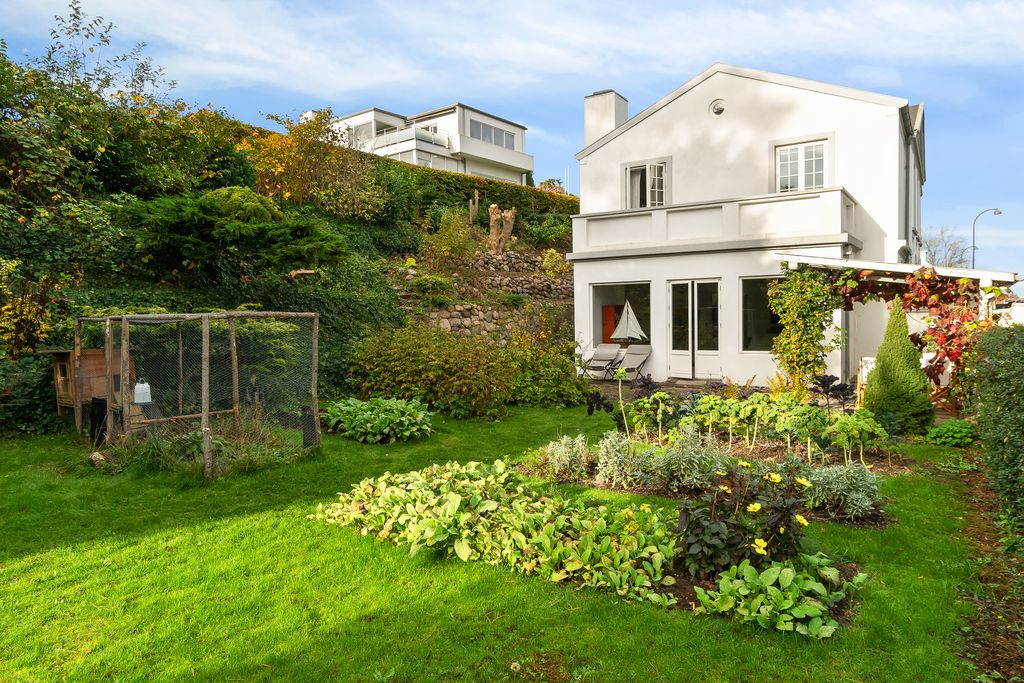
When people think about AI in photo editing, many picture prompts and generated images, not the specific angles, exposures, and clips they work with every day. Yet AI photo video editing for real estate listings is already acting inside your real workflows, adjusting frames, stabilizing footage, and tightening color so listings are ready faster and look more consistent across channels. The challenge is deciding where to lean on automation and where human judgment still leads. In this article, we break down features, tools, and workflows.
What is AI Photo Video Editing for Real Estate Listings?
AI photo-to-video editing for real estate involves using artificial intelligence to instantly transform static listing photos into dynamic, engaging video walkthroughs. These tools add motion effects, virtual staging, and AI enhancements like twilight sky replacements to create marketing content in minutes, boosting engagement and speeding up sales.
Read more: 5 Best Real Estate AI Photo Editor Tools in 2026: Speed, Quality, and Scale
Popular AI Photo & Video Editing Features for Real Estate Listings
AI now touches most stages of real estate visual production, from basic corrections to social‑ready deliverables. The key is understanding what these features actually do for your day‑to‑day work.
AI Photo Editing
At the photo level, AI systems are built to handle the routine adjustments you used to do manually on every frame:
Auto enhancement: Adjusts exposure, contrast, color, vibrance, and sharpness to create clean, bright images with minimal manual input.
White balance & color correction: Neutralizes color casts so walls, skin tones, and materials look natural and consistent across a set.
Lens and perspective correction: Fixes wide‑angle distortion and straightens verticals/horizontals so rooms feel accurate and not exaggerated.
HDR blending & window view recovery: Merges brackets to balance interiors and exteriors, preserving detail in both bright windows and darker corners.
Sky replacement & exterior enhancement: Detects skies and exteriors, then applies clearer skies, softer light, and subtle curb‑appeal improvements.
Object removal & decluttering (light level): Removes small items (cords, bins, wall marks, sensor dust) to reduce distractions without heavy manual retouching.
Style presets and brand profiles: Applies predefined looks so every shoot follows the same tone, contrast, and color profile across your portfolio.
Video Editing
AI has also moved into video editing, where it helps agents, photographers, and marketing teams create more content without building a full post‑production department.
Auto cut & highlight generation: Identifies key moments in walk‑throughs and builds a rough cut from usable clips.
Auto stabilization & framing: Reduces shake and optimizes framing so handheld footage looks smoother and more intentional.
Color grading presets for real estate: Uses presets to keep footage clean, bright, and aligned with the look of your listing photos.
Captions, hooks, and text overlays: Generates text for reels, shorts, and stories, including quick hooks, labels, and simple agent branding.
Music selection and pacing: Suggests tracks and aligns edit timing to the beat for more polished short‑form content.
Format adaptation: Outputs vertical, horizontal, and square versions from one master edit for different platforms.
Read more: 5 Best Real Estate AI Photo Editor Tools in 2026: Speed, Quality, and Scale
5 Leading AI Photo & Video Editing Tools in 2026
Different tools approach AI photo and video editing from different angles.Below is how five notable tools fit into the landscape and where they tend to be strongest.
1. Imagen.ai
Imagen.ai is focused on AI‑driven photo editing that learns from your own editing style. It is widely used by photographers and studios that want speed without losing their signature look.
Key strengths:
Learns from your past edits to create personalized profiles
Fast batch processing for large photo sets
Strong for exposure, color, and overall tonality alignment
2. PhotoAIVideo.com
PhotoAIVideo.com targets users who want one environment for both listing photos and short‑form video. It streamlines upload‑to‑export workflows with AI handling most baseline enhancements.
Key strengths:
Single platform for stills and simple video edits
AI auto enhancement, cuts, captions, and sizing for social
Practical for agents and teams needing quick, multi‑channel content
3. AutoReel
AutoReel specializes in AI video editing, particularly for social formats. It is designed to turn long property walk‑throughs into multiple polished, platform‑ready clips.
Key strengths:
Automated highlight detection and teaser creation
Strong support for vertical formats (reels, shorts, TikTok)
Music/pacing tools that speed up social content production
4. Luminar Neo
Luminar Neo is a photo editor with extensive AI assistance inside a manual, desktop‑style interface. Real estate users often adopt it when they want both automation and detailed control.
Key strengths:
AI sky replacement, relighting, and structure/detail tools
Good for refining hero images and complex scenes
Bridges automated corrections with hands‑on creative adjustments
5. Pedra
Pedra is built around workflow, brand control, and collaboration for teams managing many listings. Its AI sits inside a structured environment with templates and style profiles.
Key strengths:
Centralized style management across offices and photographers
AI photo/video enhancements aligned with brand presets
Monitoring of consistency, turnaround, and pipeline performance
Read more: Best Photo Editing For Real Estate: Workflow And AI Integration That Scales
The Pros & Cons of Using AI Editing Tools in the Real Estate Market
AI editing tools are now part of everyday real estate production, but they are not a full replacement for skilled editors or a defined visual strategy. Understanding both sides, you can decide where they fit.
Pros
Speed & volume
AI can process large batches of photos and video clips in minutes instead of hours. This supports same‑day or next‑day listing launches, keeps pipelines moving during busy seasons, and makes it easier to refresh visuals when pricing or staging changes.
Cost efficiency
Many baseline adjustments - exposure, white balance, simple crops, basic reels, can be automated at a lower per‑asset cost. This is especially helpful for teams managing high volumes of rentals, mid‑tier homes, or frequent social content.
Consistency across shoots and shooters
Once styles and presets are defined, AI applies a stable look across multiple photographers, offices, and markets. This reduces the visual variation that often appears when different people edit under time pressure.
Accessibility for non‑experts
Agents, coordinators, and marketing assistants can achieve a more professional baseline without needing great technical skills. This lowers the barrier to producing acceptable photos and simple video content in‑house.
Freeing up creative time
When AI covers repetitive corrections, professionals can focus on planning shoots, improving storytelling, designing campaigns, and giving extra care to hero assets and high‑value listings.
Cons
Limited nuance and artistic judgment
AI can miss subtle choices around mood, contrast, and color that define a brand. It may push images toward an overly bright or artificial look if not carefully configured and supervised.
Struggles with complex retouching
Heavy decluttering, challenging reflections, structural issues, and intricate textures still require manual work. Relying on automation for these can lead to visible artifacts or unrealistic results.
Generic styles
Off‑the‑shelf presets are designed to fit many users, not your specific identity. Without customization, your listings can start to resemble competitors rather than expressing your brand standards.
Inconsistent results in edge cases
Dark interiors, mixed lighting, strong color casts, or unusual layouts can confuse AI models. Outputs may vary more widely here, and some files will need extra attention.
Ethical and compliance risks
Over‑modifying imagery - removing significant elements, exaggerating views, or masking wear, can cross into misrepresentation. Without clear rules and human checkpoints, AI makes it easier to go too far without noticing.
Read more: 5 Mistakes You're Making With Your Real Estate Photo Editing AI
How to Best Utilize The Power of AI Photo & Video Editing for Real Estate Listing?
AI delivers the most value when it is treated as a defined layer in your workflow, not a black box that decides everything.
1. Define where AI fits in your workflow
Start by mapping your end‑to‑end process: ingest, selection, editing, review, delivery, and publishing. Decide which steps are suitable for AI (baseline enhancements, resizing, simple social edits) and which should remain manual (hero images, complex retouching, flagship campaigns). Document this so everyone follows the same rules.
2. Create a clear visual style guide
Put in writing what a “good” listing photo and video look like for your brand: brightness targets, contrast, color balance, saturation, preferred focal lengths, typical shot list, and framing preferences. Use this guide to configure AI presets and to brief editors so outputs feel aligned regardless of who presses the button.
3. Segment your listings by importance
Not every property needs the same level of investment. A simple framework could be:
Rentals and mid‑tier homes → mostly AI, with light review.
Luxury, new developments, and high‑visibility projects → AI plus human editing, with more time on hero visuals.
This keeps resources focused where they influence brand perception and revenue the most.
4. Always review before publishing
Build in a short review step for both photos and videos. A quick pass to check for artifacts, unrealistic edits, mismatched colors, or anything that might misrepresent the property is often enough. This can be done by editors, coordinators, or agents trained to follow a simple checklist.
5. Combine AI with branded templates
For video and social output, use branded templates: lower thirds, intros, outros, room labels, and basic layouts. Let AI handle the cutting, color, and resizing while templates ensure every asset looks like part of the same system, regardless of who created it.
6. Track performance and refine settings
Monitor how different styles and formats perform on portals and social: views, click‑throughs, watch time, and inquiries. Use this feedback to adjust AI presets, cropping logic, and color profiles so your default settings reflect what actually resonates with your audience.
7. Outsource to professional editing services when it matters most
For luxury and flagship listings, complex retouching, heavy decluttering, advanced HDR and window work, high‑impact video tours, branded campaigns, and virtual staging, consider partnering with a specialist provider such as Esoft. This lets AI carry the routine volume work while experienced teams refine the assets that most strongly shape how your brand and your most valuable properties are perceived.
Esoft as Your Specialist Partner for AI‑Enabled Real Estate Media
Esoft is a specialist partner for residential real estate visuals, working with leading real estate businesses and photographers for over 20 years. Our model combines AI automation with dedicated human editors, so you gain the speed and consistency of modern tools while keeping quality, nuance, and brand control in expert hands.
Our media editing services cover all your business needs.
Retouching – Detailed cleanup for distractions, minor imperfections, and clarity.
Enhancement – Exposure, color, and contrast refinements tuned for real estate.
Virtual dusk – Day‑to‑dusk conversions that strengthen exterior impact.
Social media – Photo sets and crops optimized for feeds, stories, and ads.
Social media video – Short, platform‑ready edits built from your footage.
Emotive video – More narrative‑driven pieces that highlight lifestyle and key features.
Parallax AI video – Motion‑driven videos created from stills to add depth and movement.
Conclusion
AI photo video editing for real estate listings is now central to how teams manage speed, volume, and consistency across photos and video. The strongest results come from a clear workflow: AI handling baseline enhancements and social‑ready formats, humans focusing on complex retouching, compliance‑safe decisions, and brand‑defining storytelling. Selecting the right tools, segmenting listings by importance, and partnering with a specialist such as Esoft helps you turn these capabilities into a stable production system. To explore how this could work in your context, contact us!
Related Blogs
How Real Estate Video Editing Boosts Property Listings and Sales?
Video Editing
How AI Real Estate Photo Editing Tools Are Transforming Property Marketing
AI Photo Editing

What Is AI Real Estate Photo Editing Software? Features, Benefits, and Use Cases
AI Photo Editing

Why AI Real Estate Photo Editing Services Are the Future of Property Listings
AI Photo Editing




Linh Phan
Content Strategy Executive
No Spam, Just Updates
Our fresh blogs provide technical and industrial information that helps strengthen your business. Sign up to be the first to receive the new updates
