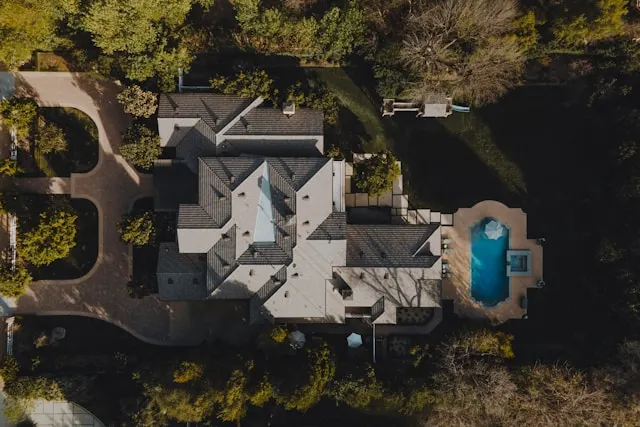
Aerial photo editing services for real estate help you turn drone shots into clear, informative visuals that support how you market every listing. With the right approach, aerials can highlight land use, outdoor features, access, and neighborhood context while staying consistent with your brand. This matters whether you handle a few drone shoots a month or manage dozens of listings across different areas. In the sections below, we’ll explore what aerial photos do best and how to edit them for maximum impact.
What is an Aerial Photo in Real Estate?
In real estate, an aerial photo is any image captured from above the property - typically by drone, helicopter, or aircraft - showing the home, land, and surroundings in a single frame. Instead of focusing only on rooms or facades, it shows how the property sits within its environment.
Aerial photos help buyers quickly read key information that is hard to see from ground level:
Full lot and outdoor features – yard size, pool, garden, patios, driveways, parking areas, outbuildings.
Context and access – street position, corner or cul‑de‑sac location, driveways, nearby roads, and amenities.
Scale and orientation – where the home sits on the lot, how outdoor spaces connect, and which areas face morning or afternoon light.
Property type fit – especially useful for large lots, rural properties, corner plots, and new developments, where layout and surroundings are major selling points.
According to a National Association of Realtors study, 57% of buyers expect to see at least 8–10 aerial shots for most residential properties, which makes aerials a core part of modern listing presentations rather than an optional extra.
How Aerial Photos Help Showcase Your Property?
Aerials are at their best when they make the property easy to understand in a few seconds. Good editing and composition work together to highlight structure, features, and setting.
Clear View of Property Boundaries and Layout
From above, buyers can see:
Total land size and shape
Building footprint and extensions
Driveways, walkways, garages, and parking
Outdoor areas such as lawns, patios, decks, pools, and play spaces
This gives a clear sense of how everything fits together, which is hard to convey through interiors alone.
Highlighting Key Selling Points
Aerial photos can place important features front and center:
Pools, gardens, outdoor kitchens, terraces, and firepits
Parking solutions such as driveways, carports, and garages
Proximity to water, parks, golf courses, or open green space
Roof condition and solar panels, which some buyers actively look for
By editing to emphasize clarity and color where it matters, you help buyers notice what justifies the asking price.
Context and Neighborhood Appeal
Buyers are not only choosing a property; they are choosing a location. Aerials can show:
Nearby schools and playgrounds
Access to transit, main roads, and commuting routes
Coastline, lakes, rivers, or natural reserves
Skyline views or notable landmarks
This visual context answers many early questions about lifestyle and convenience before a viewing is even booked.
Stronger First Impressions Online
Aerials often work well as hero images in:
Property portals and MLS thumbnails
Brochures and feature sheets
Social media posts, ads, and stories
Listing presentations and agent marketing decks
A well‑edited aerial can quickly signal that a listing is worth a closer look, improving engagement with the rest of your photos and marketing materials.
Read more: Top 6 Real Estate Photo Enhancement Services in 2026
Popular Aerial Photo Editing Services for Real Estate
Great editing turns raw aerial captures into clear, marketing‑ready visuals. These are the services that make the biggest difference for real estate listings.
HDR and Multiple Exposure Blending
On bright days, the sky and ground rarely expose well in a single frame. HDR and exposure blending help you keep everything readable.
Merge multiple exposures to retain detail in both bright skies and darker roofs, trees, and driveways.
Use careful blending and masking to avoid halos, gray skies, or crunchy contrast around rooflines and trees.
Aim for a natural result where the sky looks clean and roofs, landscaping, and roads hold detail without looking flat.
This is especially useful for midday shoots or high‑contrast weather conditions.
Color Fade / Desaturation for Surroundings
In dense neighborhoods, it can be hard to guide attention to the right home. Selective color treatments help the subject stand out.
Subtly desaturate or soften the colors of neighboring properties while keeping the listing in normal, natural color.
Keep some tone and detail in the surroundings so buyers still understand context.
Align the treatment with your branding so it looks intentional, not like a special effect.
Done well, this steers the viewer’s eye to the property you are presenting in crowded streetscapes.
Sky Replacements
Skies play a big role in how aerials feel. Replacements help maintain consistent quality across different days and shoots.
Swap washed‑out, blank, or overly gray skies with bright but realistic skies that fit the lighting direction.
Avoid overly dramatic or unrealistic skies that distract from the home.
Use cleaner skies as the basis for hero images in brochures, portals, and listing presentations.
The goal is a stable, inviting look that supports the property rather than dominates it.
Boundary Line Overlays
Boundaries are one of the main reasons agents commission aerials. Clear overlays make land size and shape easy to understand.
Add precise, clean lines that outline the lot, following survey or agent‑provided references.
Use branded colors, line weights, and labels so overlays are on‑brand and easy to read.
Keep lines and labels strong enough to see on mobile screens without covering key details of the home or land.
These overlays help buyers immediately grasp how much land is included and where it starts and ends.
Distraction Removal
Aerials often capture more than you intend. Cleanup keeps attention on the listing instead of temporary clutter.
Remove or tone down garbage cans, construction equipment, temporary signage, parked cars, or debris.
Minimize visually noisy elements like patchy worksites adjacent to the property when appropriate.
Maintain structural accuracy; focus on short‑term or movable items rather than permanent features.
The result is a cleaner, more focused image that still reflects the real setting.
Property Surroundings Information Overlays
Smart overlays turn a single image into a compact information sheet about the property and its surroundings.
Add subtle labels or icons for nearby features such as schools, beaches, parks, train stations, or business districts.
Use consistent iconography, colors, and distance markers that match your brand.
Place labels with care so they inform without cluttering the frame or hiding key property details.
As a result, buyers quickly understand lifestyle benefits and proximity to important landmarks.
Brightness and Contrast Adjustments
Fine control over tone ensures every critical part of the aerial is visible and easy to interpret.
Adjust global brightness and contrast so roofs, landscaping, and roads are all clear at a glance.
Use local adjustments to gently lift important shadow areas (e.g., under trees) without flattening the whole image.
Avoid extremes in contrast that crush shadows or blow out light surfaces like concrete and roofs.
Consistent tonal work across a set of aerials builds a professional, trustworthy impression of the listing.
Read more: Best Real Estate Photo Editing Services for the US
How to Get the Most from Aerial Photo Editing?
A few decisions at the capture and handoff stages can save time and improve quality.
Capture Tips for Better Aerials
Maintain a consistent height and angle across your set so images feel cohesive in marketing materials.
When possible, avoid harsh midday light in favor of early morning or late afternoon, which often gives better contrast and color.
Shoot in brackets (multiple exposures) for each key angle to support HDR blending and preserve sky and ground detail.
Double‑check focus and sharpness before moving to the next position, especially on windy days.
These habits give editors more flexibility and help you get the most out of aerial photo editing services for real estate.
File Handoff Best Practices
Clear instructions reduce back‑and‑forth, and help editors deliver exactly what you need.
Use consistent naming conventions (e.g., address + view type: “123MainSt_front_aerial_01”).
Provide notes or a simple sketch indicating:
Property boundaries and any easements to show or avoid.
Which images should receive boundary overlays or information labels.
Your brand colors, fonts, and logo placement preferences.
Mention any must‑remove distractions (e.g., specific vehicles, signage, or active construction).
A concise brief often makes the difference between a good result and one that perfectly fits your brand and market.
Decide What’s Standard vs. Premium
To keep workflows efficient, define which edits apply to all aerials and which count as value-added services.
Standard for most aerials:
Basic color correction and perspective fixes
HDR and exposure blending
Global brightness and contrast adjustments
Light cleanup of small distractions
Premium or on‑request services:
Detailed boundary line overlays
Property surroundings information overlays with icons and labels
Extensive distraction removal across neighboring lots or streets
Advanced treatments like heavy color fade, virtual dusk, or complex sky replacements
Having this structure makes it easier to price your services, set client expectations, and decide where partnering with a specialist like Esoft adds the most value.
Read more: Top 5 Real Estate Photo Editing Outsourcing for 2026
Esoft: Aerial Photo Editing Services for Real Estate at Scale
With 20+ years of experience in real estate imagery, Esoft helps agents, brokerages, and photographers turn aerial captures into clear, listing‑ready visuals that support sales and branding. Our hybrid AI‑human workflow combines automation for speed with experienced editors and QA for control, so you get consistent results even when volumes spike or campaigns run across multiple markets.
Our key photo editing services include:
Photo enhancement
Photo retouching
Virtual dusk
Takeaways
Thoughtful use of aerials lets buyers grasp land size, layout, and neighborhood context faster, which supports better engagement with your listings. When you combine strong capture habits with key aerial photo editing services for real estate - HDR blending, sky replacement, boundary and info overlays, and distraction cleanup - each image works harder for your marketing. Clear standards for what is included on every job, then keep results predictable at scale. To streamline your aerial editing and delivery, get in touch with our team!
Related Blogs
Virtual decluttering in real estate photo editing
Photo Editing

Commercial real estate photo editing: What's the difference?
Photo Editing
Flambient Real Estate Photo Editing: A Complete Guide for Perfect Lighting
Photo Editing
Fast real estate photo editing: The new standard of turnaround time and quality
Photo Editing



Linh Phan
Content Strategy Executive
No Spam, Just Updates
Our fresh blogs provide technical and industrial information that helps strengthen your business. Sign up to be the first to receive the new updates
