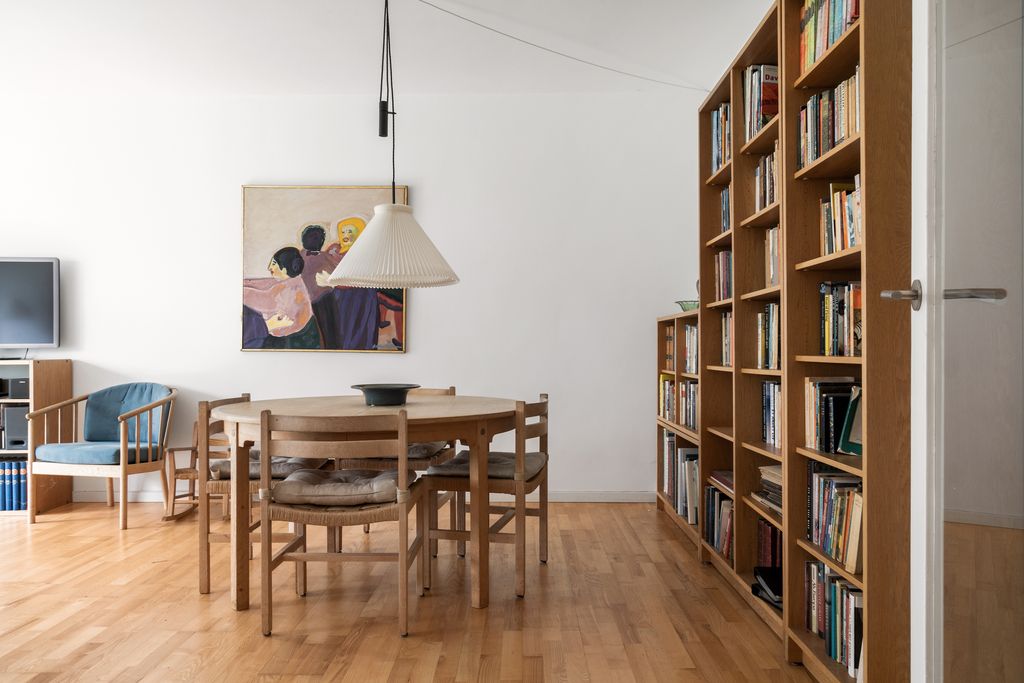
You already know listing photos can make or break a property, but 2026 has raised the bar again. Agents expect you to think beyond basic wide shots and “fix it in post” habits, and buyers scroll past anything that does not stand out immediately. In this guide, we share practical real estate photo editing tips alongside on‑site techniques: preparation with clients, smart shot lists, gear that actually matters, lighting and composition choices, and modern post‑production workflows. Let’s walk through the real estate photography habits every working photographer should refine this year.
Real Estate Photography Holds the Key to The Best Pictures
Property portals are crowded and buyers move fast. Your photos control whether a listing gets attention, clicks, and physical viewings, or quietly disappears in the feed. In 2026, this impact is clear in the numbers:
72.2% of Realtors say exceptional photography is crucial to securing more listings.
The average ROI for professional photography is 100–400%, making it one of the most cost‑effective marketing investments for agents (Gitnux).
89% of homebuyers rate professional photos as the most important factor in deciding whether to view a home (Gitnux).
HDR, clean lines, and “scroll‑stopping” hero images have shifted from “nice to have” to the expected baseline for competitive listings.
Real Estate Photography Tips Every Photographer Should Know in 2026
Preparation
Good real estate shoots are built before you unpack a camera. Clear communication, a focused plan, and the right tools will save you time on site and in editing.
1. Align With the Client and Property
Start with a short, structured briefing:
Clarify property type and price band – New build, occupied family home, luxury condo, or investment unit each call for different emphasis and coverage.
Define the target buyer – Young professionals, families, downsizers, or investors. This guides which spaces and details you prioritize.
List must‑have rooms and angles – Front exterior, key living areas, unique features, and any non‑negotiable marketing shots.
Ask the agent or owner to handle basic staging and decluttering before you arrive:
Clear kitchen counters and bathroom surfaces.
Remove personal photos and highly personal items.
Tidy kids’ rooms, cables, pet items, and bins.
When expectations are aligned early, you spend less time moving objects and more time refining composition and light.
2. Build a Smart Shot List (and Use It)
A shot list keeps you efficient on site and ensures consistent coverage across properties.
Core shots for most listings
Front exterior (straight on and one angled view).
Main living area, including any open‑plan space.
Kitchen, with at least one wide and one feature‑focused angle.
Primary bedroom and primary bathroom.
Secondary bedrooms or flex spaces as relevant.
Key amenities: balcony, terrace, garden, pool, gym, shared areas, parking.
Extras that matter in 2026
Vertical compositions for social, portals with mobile‑first layouts, and short‑form video covers.
Detail shots of materials, fixtures, views, or styling elements that agents can reuse in marketing collateral.
Context shots that show how rooms connect, helping buyers understand flow.
Keep your shot list on your phone or tablet and tick items off as you go so nothing is missed when time is tight.
3. Gear Checklist for Modern Real Estate Work
You do not need every new gadget, but you do need a reliable, repeatable kit.
Essential equipment
Camera – Full‑frame or APS‑C body with good dynamic range and solid performance at moderate ISOs.
Lens – A rectilinear wide‑angle (often in the 14–24mm full‑frame equivalent range); avoid ultra‑wide fish‑eye looks that distort spaces.
Tripod – Stable, easy to adjust, with a head that makes leveling simple.
Remote trigger or self‑timer – To minimize camera shake, especially when bracketing.
Spare batteries and memory cards – Enough to handle back‑to‑back shoots without stress.
Helpful additions
Flash or small strobe – For flambient work or subtle fill where ambient light is not enough.
Polarizer – Used carefully to manage reflections on windows or shiny surfaces, without creating patchy skies.
Compact gimbal or phone rig – If you also capture short video clips, reels, or simple property walkthroughs.
Pack with a checklist so you can maintain consistent results regardless of location or schedule pressure.
*Core Skills to Prioritize in 2026
Gear helps, but your skills determine how quickly you deliver strong files for editing.
Dynamic range and bracketing – Know how many brackets you need for typical interiors, how far apart they should be, and when single exposures are enough. This makes HDR or flambient workflows more efficient.
Composing for horizontal and vertical outputs – Frame scenes so they work as MLS‑friendly horizontals and can be adapted to vertical crops for social feeds and portal apps.
Comfort with AI‑assisted editing workflows – Understand how your files will move through HDR merging, AI‑powered base corrections, and manual refinements. This helps you expose and compose in ways that maximize quality while keeping editing time under control.
These fundamentals position you to adapt as client expectations and post‑production tools continue to evolve.
Read more: Real estate photo editing companies USA: Adapting to the fast-paced market
On‑Site Shooting
1. Set the Scene, Inside and Out
Arrive a few minutes early to walk the property and fix small issues that distract online:
Outside: Move trash bins, garden tools, and hoses; close garage doors; reposition cars if possible so the front exterior is clean.
Inside: Straighten chairs and bedding, fluff pillows, align rugs, and hide visible cables, remotes, pet bowls, and highly personal items.
You do not need perfect styling, but you do need a space that looks intentional and calm in photos.
2. Compose for Clarity and Flow
Your images should help buyers understand how the home works, not just how it’s decorated.
Prioritize layout: Choose angles that show how rooms connect - entries, openings, and sightlines.
Keep verticals straight: Level the camera and correct remaining tilt later; leaning walls instantly feel amateur.
Avoid extreme wide distortion: Do not push focal lengths so far that furniture, doors, and windows warp.
Shoot hero and connector shots: Capture the main “wow” angle for each key room, plus secondary angles that clarify how spaces relate.
Think of the final set as a visual tour a buyer can follow in order.
3. Light Like a Pro
Light quality separates average sets from strong ones more than almost anything else.
Use natural light first: Whenever possible, schedule when the main living areas receive soft, even light. Open blinds and curtains, but watch for harsh direct sun that blows out highlights.
Know when to bracket: Use exposure bracketing when interiors have bright windows or mixed lighting that you cannot control. This gives you flexibility for HDR or manual blends.
Choose HDR vs. flambient:
Use simple HDR for most balanced interiors with moderate contrast.
Use flambient (ambient plus flash exposures) for complex mixed light, strong color casts, or higher‑end shoots where you want cleaner, more detailed results.
Make lighting choices that match the property level and the expectations you set with the client.
4. Showcase the Home’s “Set Pieces”
Every property has a few features that sell the story - make sure you find and show them.
Identify key elements: Views, a kitchen island, fireplace, primary suite, outdoor living space, home office, or community amenities. Confirm these with the agent if needed.
Shoot wide and tight:
Wide context shots that show the feature in the room or space.
Tighter detail shots that highlight textures, finishes, and special touches for marketing materials and social.
These images often become the hero photos for listings, ads, and campaigns.
5. Shoot for Options and for Multiple Channels
Give your client enough variety to work across platforms without needing a reshoot.
Capture safe angles and creative alternatives: Start with the obvious, safe compositions, then grab a few variations with different heights, focal lengths, or slight angle shifts.
Mix horizontals and verticals:
Horizontals for web, MLS, and brochure layouts.
Verticals for social posts, reels covers, stories, and mobile‑first portals.
More options at the capture stage give you flexibility later without relying on heavy cropping.
Read more: 5 Real estate photo editing company worth considering in 2026
Post‑Production
1. Core Editing Principles for Real Estate
Your editing should make the property look its best while staying believable and platform‑compliant.
Balanced exposure: Interiors should be bright and inviting, with window views visible where possible but not overemphasized.
Natural color and white balance: Skin tones in portraits, if any, and materials like wood and stone should look realistic; avoid heavy color casts.
Straight verticals and corrected distortion: Fix lens distortion and converging lines so walls and door frames look stable.
Clean but honest retouching: Remove small distractions and temporary clutter, but do not misrepresent permanent features or hide material issues.
A simple style guide or preset set helps you keep these principles consistent across jobs.
2. Editing Techniques: HDR, Flambient, and AI‑Assisted Workflows
Choose techniques that match the property and your volume.
When HDR is enough: Standard listings, evenly lit rooms, and moderate contrast scenes can often be handled with well‑set auto or manual HDR merging and light refinements.
When flambient/manual blending helps: High‑end properties, complex lighting, strong color casts, or spaces with important window views benefit from more controlled blending of flash and ambient frames.
Using AI tools effectively:
Let AI handle baseline tasks: HDR merges, noise reduction, lens corrections, sky adjustments, and basic color/exposure.
Keep human control for perspective, local adjustments, window work, and retouching choices.
Maintain a consistent look by using shared presets, profiles, or editing recipes across your team.
The goal is to speed up repetitive steps so you can focus on decisions that actually affect quality.
3. Essential Tools in a Modern Real Estate Workflow
You do not need every piece of software, but a solid core stack matters.
Lightroom Classic (with AI features): Cataloging, global adjustments, lens corrections, HDR merges, AI denoise, and basic object removal.
Photoshop or similar: Localized retouching, complex object removal, window comps, flambient blending, and advanced fixes.
Dedicated real estate AI tools: Platforms and plugins that automate HDR, perspective correction, sky replacement, and batch edits tailored to property imagery.
DIY vs. delegating
DIY editing gives you full control, can work well at lower volumes, and helps refine your style, but it can cap how many shoots you can handle.
Delegating to a specialist or AI‑plus‑human partner can free up time for shooting, sales, and client management while keeping style consistent across higher volumes.
Read more: Mastering Real Estate HDR Photo Editing
Scaling Your Real Estate Photography Business with Esoft’s Outsourcing Services
When Editing Becomes Your Bottleneck
Most growing photographers hit the same wall: you can book more shoots, but you cannot add more hours to your day. The slowdown usually appears in post‑production:
You spend nights and weekends in Lightroom instead of prospecting or shooting.
Turnaround times slip during peak season, and agents start asking for updates.
Larger clients want guaranteed delivery windows you cannot confidently promise.
Style becomes inconsistent when you mix in ad‑hoc freelancers or multiple tools.
At this point, editing is no longer just a task - it is a capacity limit on your business. To move beyond it, you need production that behaves like infrastructure: stable, predictable, and scalable.
How a Hybrid AI‑Plus‑Human Editing Partner like Esoft Can Support You
Esoft is built for real estate teams that need photo editing to run like infrastructure, not as a patchwork of separate apps. When you are managing hundreds or thousands of images across peak seasons and multiple markets, you need predictable quality, timing, and style.
Esoft uses an AI‑hybrid (AI‑powered, human‑controlled) media editing pipeline:
AI handles: HDR blending and base exposure balancing; Core color correction and contrast; Sky optimization and other repeatable adjustments.
Experienced real estate editors refine: Verticals, geometry, and architectural accuracy; Window views, tones, and local adjustments; Clutter removal, object cleanup, and virtual dusk work.
The focus is on production‑ready outputs that match your brand:
High‑volume photo enhancement for interiors and exteriors.
Consistent HDR and window‑pull across full sets, not just hero shots.
Controlled retouching and virtual dusk that respect property reality and platform guidelines.
For teams that have reached the limits of in‑house editing and standalone AI apps, Esoft provides a centralized, quality‑controlled photo editing operation that scales with your listing pipeline and frees you to focus on shooting and growing your business.
Takeaways
Real estate photo editing tips only work when they connect with solid on‑site habits: preparation with clients, clear shot lists, reliable gear, and thoughtful choices around light, composition, and “set pieces.” In post, balanced exposure, natural color, straight lines, and consistent use of HDR, flambient, and AI tools turn those captures into listing‑ready sets that work across channels. When editing time starts holding back your growth, a structured AI‑plus‑human partner can keep quality and turnaround stable at scale. If you are ready to expand your capacity and standardize results, contact Esoft.
Related Blogs
What 1 Million Photos Reveal About Buyer Psychology In Real Estate Photo Editing In The United States
Photo Editing

Transform Your Real Estate Images with the Best Photo Editing Software
Photo Editing

Best Real Estate Photo Editing Services for the US
Photo Editing
How to Shoot the Best Real Estate Twilight Photos
Photo Editing



Linh Phan
Content Strategy Executive
No Spam, Just Updates
Our fresh blogs provide technical and industrial information that helps strengthen your business. Sign up to be the first to receive the new updates
