If you often feel rushed in post‑production, a clear real estate photo editing tutorial can give you structure and control. Instead of guessing which sliders to move first, you follow the same steps every time: balance exposure, correct lines and color, clean up distractions, and prepare images for MLS and social. This article outlines 10 simple steps you can repeat for each shoot, then shares ways to save time when your volume grows.
Real estate photo editing tutorial: 10 simple steps you may follow
You can follow these steps in Lightroom, Capture One, Photoshop, or a dedicated real estate platform. The structure and order matter more than the specific software.
1. Import and Basic Exposure Balancing
Start by organizing your files and getting a clean, neutral base for every image.
Import and group images by room/scene, keeping bracket sets together.
Apply a neutral camera/profile (avoid heavy contrast or saturation presets).
Set overall exposure and contrast so the room feels naturally lit, without clipped highlights or blocked shadows.
Use a neutral area (ceilings, trim, cabinets) to set white balance, then fine‑tune temperature and tint.
2. HDR Blending and Bracketing
Use your bracketed exposures to handle bright windows and darker interiors.
Pick 3–5 exposures that cover shadows, midtones, and highlights (including a good window frame).
Merge with your HDR/flambient tool or manually stack in Photoshop.
Reduce overly strong clarity/dehaze to avoid “crunchy” textures.
Check for halos around windows, lights, and furniture edges; adjust strength or masks if they appear.
3. Line Straightening and Perspective Correction
Correct geometry early so spaces feel comfortable and true to life.
Use transform/upright tools to make verticals truly vertical (walls, doors, windows).
Level key horizontals such as countertops and horizons.
Apply lens profiles to fix barrel or pincushion distortion.
Compare before/after and stop before the room looks squeezed or stretched.
Read more: Photo Editing Real Estate for Premium Listings: Requirements for Soul and Style
4. Color Cast and White Balance Corrections
Mixed lighting often leaves unwanted color casts that need careful correction.
Look for yellow/orange, green, or blue shifts from bulbs and daylight.
Use ceilings, trim, doors, and neutral furniture as your reference for clean whites.
Adjust global temperature and tint first, then use local tools to fix problem areas.
If any people are in frame, confirm skin tones look natural, not overly pink, yellow, or green.
5. Adjusting Saturation and Vibrance
Refine the color intensity so it supports the property rather than distracting from it.
Increase vibrance first, then saturation in small steps.
Double‑check kitchens and bathrooms so whites and neutrals stay accurate.
Keep exterior greens (grass, trees) lively but not neon.
Make sure skies are pleasant but not so bold they overpower the home.
6. Noise Reduction and Sharpening
Clean files and controlled sharpening help your images hold up full‑screen.
Zoom to 100% in darker areas to judge noise levels.
Apply luminance noise reduction just enough to tame grain while keeping texture.
Use masked or selective sharpening so edges and details are crisp but walls and ceilings stay smooth.
Keep output in mind: add a bit more sharpening for web, less aggressive for large prints.
7. Object Removal and Cleanup
Tidy the frame so attention stays on layout and features, not distractions.
Remove cables, chargers, small clutter, and sensor dust with healing/cloning tools.
Tone down or remove distracting reflections in mirrors, glass, or TVs when appropriate.
Leave permanent fixtures and structural elements unless specifically requested by the client.
Aim for “well prepared and honest,” not an entirely altered version of the property.
8. Adding or Refining Objects (When Appropriate)
Use small additions carefully and only when they help viewers understand the space.
Add light virtual elements such as a neutral TV screen image, simple decor, or a plant if needed.
Match the perspective, scale, and lighting of the existing scene.
Keep styles aligned with the property type and target buyer.
If you feel tempted to add many items, consider offering full virtual staging instead.
9. Sky Replacement and Twilight Effects
Subtle sky work can improve exteriors without misrepresenting conditions.
Choose a replacement sky that matches the direction and softness of light in the scene.
Carefully refine edges around trees, roofs, and antennas.
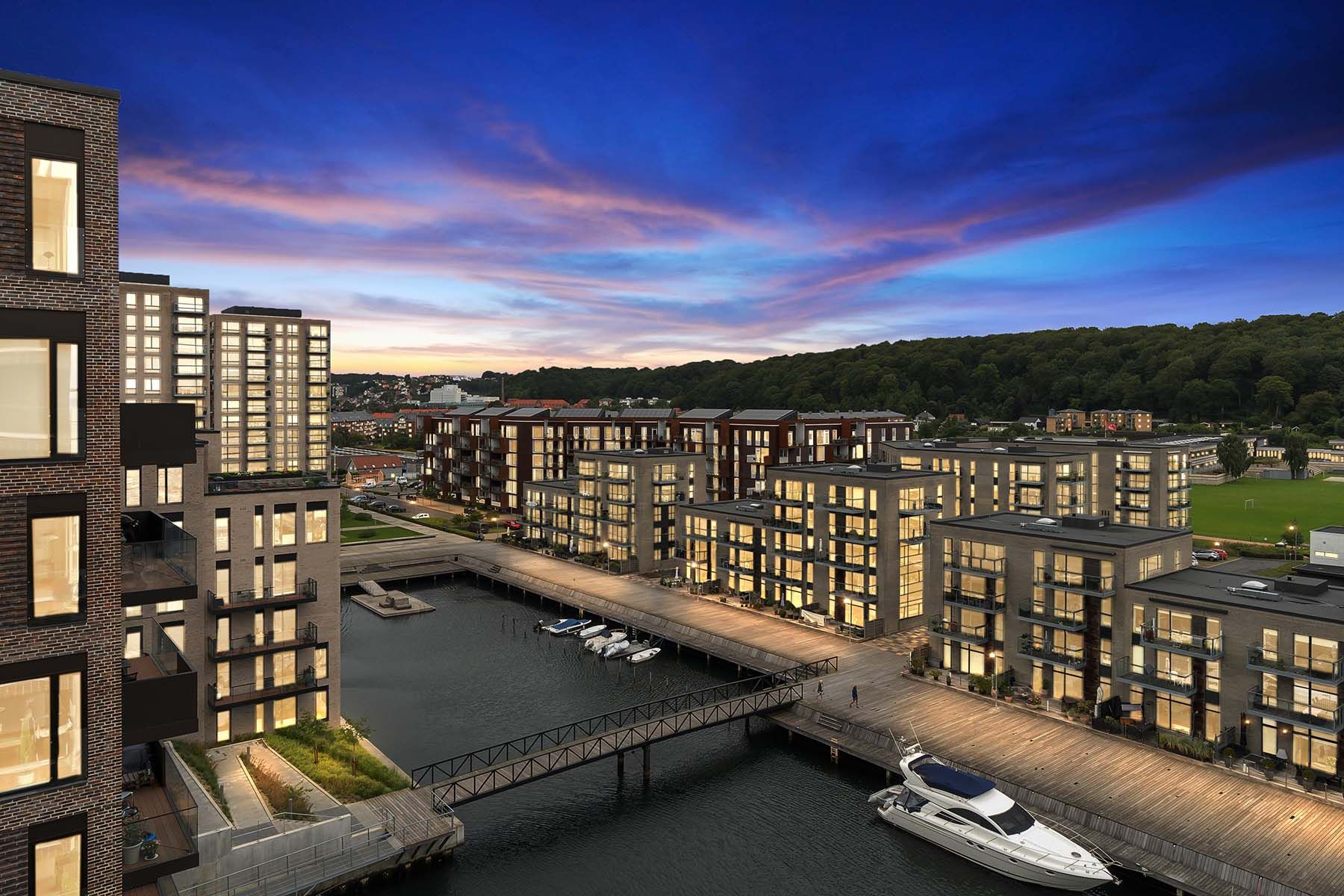
For day‑to‑dusk, gently darken the scene, warm interior/exterior lights, and add a soft twilight sky.
Keep the overall mood inviting and believable, not overly dramatic.
10. Window Masking and Final Polish
Finish with the details that separate average edits from professional sets.
Use masks or layers so window views are readable but not brighter than the interior.
Avoid windows that are pure white or much darker than the room.
Run a quick set‑wide check for consistent exposure, color, and contrast.
Confirm crop, aspect ratio, filenames, and export presets for MLS, portals, and social are correct before delivery.
Read more: 2026 Popular Services & Add-Ons Demand In Real Estate Photo Service
How to Save Time When You Need to Edit in Scale?
Choosing the right partner is about more than price. You are adding a new link to your production chain, so it needs to fit how you work.
Why Outsource
Outsourcing is most useful when editing starts to crowd out higher‑value work.
You may be spending too much time in post‑production if:
You regularly work late or on weekends just to finish edits.
You delay marketing, sales, or client communication because you are still editing.
Turnaround times slip during peak seasons, and clients start asking for updates.
It helps to look at cost vs. value. Estimate what one hour of your time is worth when you are:
Shooting new jobs.
Meeting agents or expanding relationships.
Improving your marketing or pricing.
Then compare that to the per‑image or per‑job cost of outsourcing. If an editor can complete in 30 minutes what takes you an hour, and you can use that hour to create more revenue, outsourcing part of your workflow becomes easier to justify.
A common split that works well:
Keep in‑house:
Culling and selecting the best frames.
Simple global adjustments or applying your preferred base preset/AI profile.
Final approvals and client communication.
Outsource heavy or time‑consuming tasks:
HDR blending and complex exposure merges.
Window masking and tricky interior–exterior balance.
Detailed object removal and decluttering.
Twilight/day‑to‑dusk conversions and sky replacements.
Virtual staging and other advanced visual services.
This way, you still control the creative direction and client experience while offloading the labor‑intensive parts.
How to Select an Outsourced Real Estate Photo Editing Partner?
Choosing the right partner is about more than price. You are adding a new link to your production chain, so it needs to fit how you work.
Quality and Style Match
Look for:
Clear before/after examples that feel close to how you want your images to look.
Trial edits so you can see how they handle your files, not just portfolio samples.
A process for recording and following your style (style guides, notes, reference images).
If they can quickly get close to your look and adjust based on feedback, you will spend less time revising.
Turnaround and Capacity
Ask direct questions about:
Typical turnaround times for standard and complex jobs.
How they handle busy seasons and whether deadlines remain consistent.
Any limits on daily or monthly volume so you know when you might hit capacity.
You want predictable delivery that fits your clients’ expectations.
Service Range
Consider both your current needs and what you may add later:
Core enhancement and retouching.
HDR, window pulls, and advanced interior work.
Sky replacement, twilight, and virtual staging options.
Extras such as floor plans, video, and social media assets.
A broader service range lets you grow without juggling multiple vendors.
Communication and Revisions
Smooth communication saves time and prevents repeated mistakes. Look for:
Clear points of contact and support channels.
Simple, transparent revision policies.
A way to store preferences so you do not have to repeat instructions on every job.
This helps you refine results over time instead of starting from scratch with each order.
Data Security and Reliability
Finally, consider how they handle your files and your clients’ information:
File transfer methods and storage practices.
Any security measures they have in place.
Track record with long‑term clients and stability as a business.
A reliable provider becomes part of your long‑term workflow, supporting you as your volume and service mix grow.
Read more: How Photography Editing Companies Work With Real Estate Media Franchises?
Esoft: A Partner for Scalable Real Estate Photo Editing
With 20+ years of experience in real estate visuals, Esoft is built to integrate smoothly into your existing workflow and support you as volumes grow. We work with photographers, studios, and real estate brands across multiple markets, so our editors understand how images need to perform on MLS, portals, and social.
Our core photo services include:
Photo enhancement – consistent exposure, color, and perspective corrections across full sets.
Photo retouching – detailed object removal, decluttering, and polishing for high‑impact images.
Virtual dusk – realistic day‑to‑dusk conversions that add mood without overselling the property.
Social media photo – platform‑ready crops, formats, and light branding for feeds, stories, and ads.
When you work with Esoft, you gain a team focused on reliability: predictable turnaround, stable quality, and a style that can be tuned to your brand so you spend less time fixing edits and more time shooting, selling, and growing your business.
Conclusion
Now with our real estate photo editing tutorial, you know how to move through a clear sequence: balance exposure, blend HDR, fix lines, clean up color, control saturation, reduce noise, remove distractions, refine skies and windows, then export for MLS and social. When your volume increases, shifting heavy tasks to a trusted partner lets you focus on shooting, clients, and growth while keeping quality stable. If you are ready to scale your editing with support, get in touch with us!
Related Blogs
Real Estate Photo Editing Tutorial: 10 Simple Steps To Have Stunning Photos
Photo Editing

Which photo editing services for real estate photographers best suit your needs?
Photo Editing
Real Estate Photo Editing Companies USA: Adapting To The Fast-Paced Market
Photo Editing
2026 Popular Services & Add-Ons Demand In Real Estate Photo Service
Photo Editing



Linh Phan
Content Strategy Executive
No Spam, Just Updates
Our fresh blogs provide technical and industrial information that helps strengthen your business. Sign up to be the first to receive the new updates
